

Searching “pharmacy near me Camden NW1” brings up three results on Google Maps. Your pharmacy isn’t one of them.
Your competitor down the road appears first. They get the phone calls. They get the footfall. They get the emergency prescription requests at 9 pm on a Sunday.
This happens because people no longer search for “pharmacy London” – they now search by borough, postcode, or neighbourhood. Your potential customers type “pharmacy Hackney E8 open now”, or “prescription delivery Islington N1”, or “flu jab Southwark SE1.”
Each London borough is its own battleground. This guide shows you how to win yours through hyperlocal SEO that dominates the map pack and drives customers through your door.
Why Do London Pharmacies Need Borough-Level Local SEO?
London’s 32 boroughs contain over 1,800 pharmacies. Competition is fierce.
Most pharmacy searches include location terms. When someone needs a prescription filled or a health consultation, they want it nearby – today, not tomorrow.
Borough-level optimisation matters because Google ranks local businesses based on three key factors: proximity, relevance, and prominence.
Your pharmacy in Wandsworth, SW18, won’t rank for “pharmacy Barnet” searches. You must focus on the specific boroughs and postcodes you actually serve.
Medical services demand trust. People choose pharmacies based on reviews, accessibility, and local reputation. They want to know you’re their neighbourhood pharmacy – the one that understands their needs, offers weekend opening, or provides home delivery in their area.
How to Set Up Your Pharmacy’s GBP for Maximum Local Impact
Your Google Business Profile is your digital shopfront. Industry data shows that GBP signals account for up to 32% of all map pack ranking factors.
Start by claiming and verifying your profile at Google Business Profile. Google will send a verification postcard to your physical address. This takes five to seven days, so start now.
What Information Should You Include in Your GBP?
Fill every section:
Primary category:
Choose “Pharmacy” as your main category. This tells Google exactly what you do.
Additional categories:
Add relevant secondary options like “Medical Clinic,” “Vaccination Centre,” “Prescription Service,” or “Drugstore.” Each category helps you appear in more searches.
Business name:
Use your registered pharmacy name. Don’t stuff keywords like “Best Pharmacy Camden NW1 Open Late” – Google flags and suspends listings with keyword-stuffed names.
Address:
Include your complete address with postcode. This helps Google’s proximity algorithm. A pharmacy at “125 High Street, Camden Town, London NW1 7JE” ranks higher for Camden searches than one listing just “London.”
Phone number:
Use a local London number that customers can call directly.
Website:
Link to your main website. Ensure the site is mobile-friendly – most local searches occur on phones.
Opening hours:
Please provide exact hours for each day. Include bank holidays and special hours. Many searches include “open now” – accurate hours prevent frustrated customers.
How Do You Optimise Your GBP Description?
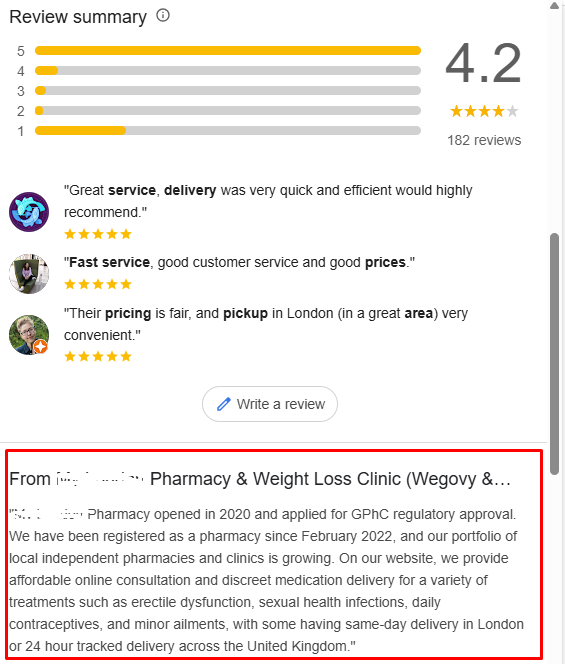
Write a concise description using language patients recognise. Include your borough and postcode naturally:
” Kingfisher pharmacy in Hackney E8, providing NHS prescriptions, private consultations, travel vaccinations, and blood pressure monitoring. Open seven days with evening appointments available. Serving Hackney, Dalston, and London Fields since 1998.”
This description includes location terms, services, and unique selling points without keyword stuffing.
What Services Should You List?
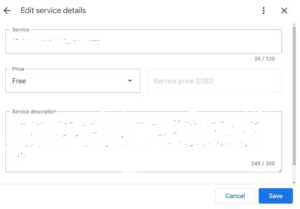
Add every service you offer as individual service listings:
- Prescription collection and delivery
- Travel vaccinations (yellow fever, hepatitis, typhoid)
- NHS flu jabs
- Private health checks
- Blood pressure monitoring
- Emergency contraception
- Smoking cessation support
- Diabetes screening
- Weekend and evening opening
Each service creates another opportunity to appear in searches. Someone searching “travel vaccines Ealing W5” should find you.
Should You Use Attributes?
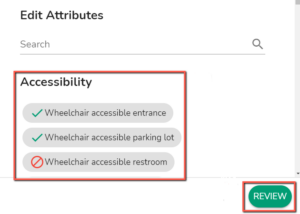
Yes. Add relevant attributes like:
- Wheelchair accessible
- Free parking nearby
- Accepts walk-ins
- Wi-Fi available
- Gender-neutral toilets
These attributes appear in your GBP and help customers understand your accessibility.
What Photos Should You Upload?
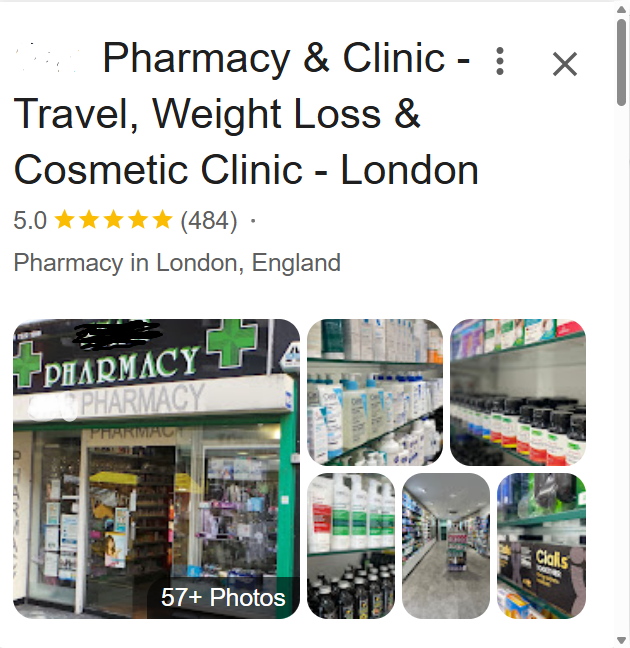
Upload high-quality photos of the exterior and interior of your pharmacy. Include:
- Clear shopfront showing your signage and postcode area
- Interior showing consultation rooms and dispensary
- Staff photos (with permission)
- Parking or transport links nearby
- Products and services on offer
Add geo-tagged photos. These send location signals to Google. Take photos with your phone’s location services enabled.
Update photos every month. Google favours active businesses.
Dive deeper: How to Optimise Google Business Profile for Your Pharmacies and Clinics
How to Make Your Pharmacy’s GBP More Borough-Specific
Now you have the basics. Next, add borough and postcode signals.
Where Should You Include Borough Names?
Include your borough and neighbourhood in:
Business description: “Pharmacy in Camden Town NW1”, not just “Pharmacy in London.”
Service descriptions: “Flu vaccinations for residents in Camden, Kentish Town, and King’s Cross” give a specific geographic context.
Google Posts: Create weekly posts highlighting services with borough mentions. “Walk-in flu jabs now available at our Islington N1 pharmacy. Open Saturday and Sunday.”
Should You Add Geo-Coordinates?
The GBP form doesn’t require coordinates, but adding them to your website schema ensures your exact map pin location matches your address.
Find your coordinates by searching your address on Google Maps. The URL contains latitude and longitude values. For example: 51.5397, -0.1437 for a Camden location.
How to Structure Your Pharmacy’s Website for Borough-Level SEO
Your website must match and reinforce your GBP signals.
Should You Create Separate Landing Pages for Each Borough?
Yes. Create dedicated pages for each borough or postcode area you serve.
URL structure:
- /pharmacy-london-camden-nw1
- /pharmacy-london-hackney-e8
- /pharmacy-london-southwark-se1
Page content:
Each page should include:
- Borough and postcode in the H1 heading: “Your Local Pharmacy in Camden NW1”
- Neighbourhood-specific information: “Located 2 minutes from Camden Town station, next to Sainsbury’s on High Street”
- Local landmarks: “Opposite Regent’s Park, serving Camden Market area”
- Transport links: “5-minute walk from Camden Town, Mornington Crescent, and Chalk Farm tube stations”
- Service availability: “Open late for workers commuting through Camden. Sunday opening for weekend emergencies”
- Specific local needs: “Travel vaccines for trips abroad – popular with Camden’s international community”
How Specific Should Your Borough Content Be?
Your borough content should be very specific. Generic content doesn’t rank.
Bad example: “We’re a pharmacy in London offering prescriptions and health advice.”
Good example: “We’re your local pharmacy on Well Street, Hackney E9. We serve Victoria Park Village, Hackney Wick, and Homerton. We’re open evenings until 9 pm for commuters, offer same-day prescription delivery across E9, and provide walk-in blood pressure checks every Tuesday morning.”
The specificity signals local relevance to Google and resonates with actual residents.
What Schema Markup Do You Need?
Schema markup is code that tells search engines exactly what your business is and where it operates.
Add LocalBusiness and Pharmacy schema to every page. The code looks like this:
{
“@context”: “https://schema.org”,
“@type”: “Pharmacy”,
“name”: “Kingsland Pharmacy”,
“description”: “Kingsland pharmacy in Camden NW1 providing NHS prescriptions, travel vaccinations, and health consultations”,
“address”: {
“@type”: “PostalAddress”,
“streetAddress”: “125 High Street”,
“addressLocality”: “Camden Town”,
“addressRegion”: “London”,
“postalCode”: “NW1 7JE”,
“addressCountry”: “GB”
},
“geo”: {
“@type”: “GeoCoordinates”,
“latitude”: “51.5397”,
“longitude”: “-0.1437”
},
“telephone”: “+442071234567”,
“openingHours”: [“Mon-Fri 09:00-19:00”, “Sat 09:00-17:00”, “Sun 10:00-14:00”],
“priceRange”: “£200-£500”,
“url”: “https://www.kingslandpharmacy.co.uk”
}
Adding LocalBusiness Schema Markup translates your human-readable content into machine-readable language. This helps Google understand and display your information correctly.
Add this code to your website’s header section or use a plugin like Schema Pro for WordPress sites.
What Keywords Should London Pharmacies Target?
You should focus on location-specific keywords instead of general phrases.
How Do You Build a Keyword Strategy for Your Borough?
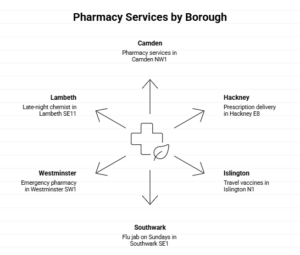
Combine three elements:
- Core service: pharmacy, chemist, prescriptions, vaccinations, health check
- Borough/postcode: Camden, NW1, Hackney, E8, Southwark, SE1
- Modifier: open now, late night, Sunday, emergency, delivery
Examples:
- pharmacy Camden NW1
- prescription delivery Hackney E8
- travel vaccines Islington N1
- flu jab Southwark SE1 open Sunday
- emergency pharmacy Westminster SW1 open now
- late-night chemist Lambeth SE11
What Are LSI Keywords for Pharmacies?
LSI (Latent Semantic Indexing) keywords are related terms that Google expects to see together. For pharmacies, include:
- prescription collection
- prescription refills
- NHS prescription service
- prescription delivery
- over the counter medication
- travel vaccinations
- flu jab
- health check
- blood pressure monitoring
- medication review
- local chemist
- community pharmacy
- consultation room
- pharmacy services
Use these naturally throughout your content. Please don’t force them.
Should You Target “Pharmacy Near Me” Searches?
You don’t target “near me” directly in your content. Google automatically interprets “near me” searches based on the searcher’s location.
Instead, optimise for the implied local intent:
- Ensure accurate GBP address
- Add borough and postcode to page titles and content
- Include transport and landmark references
- Make the mobile experience fast and clear
When someone in Hackney searches “pharmacy near me,” Google shows pharmacies close to Hackney – if those pharmacies have strong local signals.
How to Create Content That Ranks for Borough Searches
Many people say that content is king. Content marketing establishes local authority and builds customer trust.
What Type of Content Should You Create?
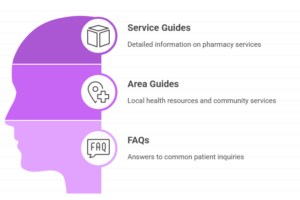
Build helpful, location-specific guides:
Service guides:
- “Where to Get Travel Vaccines in Ealing: Your Complete Guide”
- “Flu Jabs in Tower Hamlets: Walk-in Clinics and Opening Times”
- “Late Night Pharmacies in Westminster: Emergency Prescription Services”
Area guides:
- “Pharmacies Near King’s Cross Station: Location and Services”
- “Weekend Pharmacy Opening in Hackney: Saturday and Sunday Services”
- “Prescription Delivery in Islington: Same-Day Service Areas”
FAQs:
- “Which pharmacies in Camden are open on Sundays?”
- “Can I get emergency contraception in Lambeth without a prescription?”
- “How do I transfer my NHS prescription to a Southwark pharmacy?”
How to Write Borough-Specific Content
Answer real questions your local community asks. Think about:
- Transport: “We’re 5 minutes from Clapham Junction station, perfect for commuters needing evening appointments.”
- Local events: “Winter flu jab clinics supporting Hackney schools’ health programmes”
- Demographics: “Extended hours for shift workers in Canary Wharf E14”
- Accessibility: “Ground floor access for wheelchair users in our Brixton SW9 branch”
Should You Mention Competitors?
No. Focus on your own services and geographic coverage.
How Important Are Reviews for Map Pack Rankings?
Reviews are very important. A survey shows that review signals account for 20% of the local pack ranking factor.
How to Get More Google Reviews
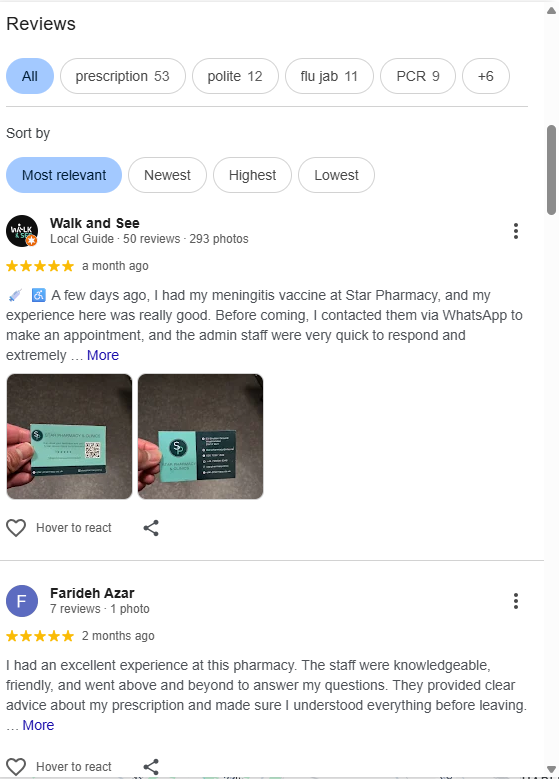
Ask every satisfied customer to give a review. Make it easy:
In-person: “We’d appreciate a quick review on Google. Here’s a card with the link.” Print QR codes linking directly to your review page.
Email: Send follow-up emails after services: “Thanks for visiting our pharmacy today. Share your experience with a Google review.”
Receipt: Print the review request on receipts.
SMS: For delivery customers, text a review link after delivery is complete.
What Should You Do About Negative Reviews?
Respond professionally and show you value customer feedback.
Example response:
“Thank you for sharing your experience. We’re sorry your visit didn’t meet expectations. We’ve addressed the wait time issue with our team. Please contact our manager directly at +442071****** so we can make this right. We value your feedback and hope to serve you better.”
Never argue. Never ignore. Always respond within 24 hours.
Should Reviews Mention Borough Names?
Encourage customers to mention location naturally: “Great pharmacy in Camden – staff are brilliant, and they’re open late.” This adds local context to your review profile.
How to Build Local Citations for Your London Pharmacy
Citations are mentions of your business name, address, and phone number across the web.
One study shows that business directories make up 31% of local-intent organic search results.
What Directories Should You List Your Pharmacy On?
Healthcare directories:
- NHS
- Pharm Data
- Your Local Pharmacy UK
General UK directories:
- Yell
- Thomson Local
- Bing Places
- Apple Maps
London-specific directories:
- Time Out London
- Londonist
- Borough council business directories
- Local community websites
Healthcare platforms:
- Healthline UK
- Patient
How Important Is NAP Consistency?
NAP consistency is crucial. Your Name, Address, and Phone number must be identical everywhere.
Wrong:
- “Swinton Pharmacy” on one site
- “Swinton Community Pharmacy Ltd” on another
- “The Swinton Pharmacy” on a third
Correct:
- Use exactly the same name everywhere
- Same address format: “125 High Street, Camden Town, London NW1 7JE”
- Same phone number with the same formatting
Google cross-references citations. Inconsistency creates confusion and damages rankings.
What Local Link Building Strategies Work for London Pharmacies?
Backlinks from trusted London sites boost authority.
Where Can You Get Local Links?
Borough council sites: Sponsor local health initiatives. Many councils list sponsors and partners.
Local news: Get featured in borough newspapers for health campaigns or community services. “Hackney Gazette features local pharmacy’s flu jab drive for elderly residents.”
Community organisations: Partner with local charities, schools, or sports clubs. Offer health screenings at community events.
Local business associations: Join your borough’s Chamber of Commerce or Business Improvement District.
Health blogs: Contribute expert articles to London health and lifestyle sites.
Local directories: Quality directories provide both citations and backlinks.
Should You Sponsor Local Events?
Yes. Sponsoring health fairs, school events, or community programmes earns:
- Local backlinks from event websites
- Brand visibility in your borough
- Natural mentions in local media
- Trust within your community
Example: Sponsor a 5K run in Wandsworth. The event website links to your pharmacy. Local blogs covering the event mention you. Residents see your brand supporting their community.
How to Optimise for Mobile and Voice Search
88% of people do a local search on their smartphone and visit a store within 24 hours.
What Makes a Pharmacy Website Mobile-Friendly?
A mobile-friendly website loads fast, feels easy to use on a small screen, and adapts smoothly to different devices.
Here are the core elements that define it:
1. Responsive, CSS-driven layout
Google doesn’t want a separate m. sites anymore. A single responsive design helps ensure identical content, internal links, and structured data across devices.
2. Excellent Core Web Vitals on mobile
Mobile scores matter more than desktop scores. Focus on:
- LCP under 2.5s
- CLS near zero
- INP under 200ms
Mobile performance directly influences visibility, especially in competitive niches.
3. Lightweight technical setup
- Minified JS and CSS
- Delayed non-critical scripts
- Modern image formats (WebP, AVIF)
- Efficient font loading
This prevents script-blocking and improves crawling.
4. Fast server response time
Mobile UX collapses with slow hosting or unoptimised backend processes.
5. Touch-friendly and crawl-friendly navigation
- Logical site structure
- Clickable elements spaced well
- No deep navigation levels
- No JS-blocked content
Google must crawl everything the user can access.
6. Content parity across devices
Because of mobile-first indexing, mobile pages must show the same content, internal links, schema, and alt text as desktop.
7. Minimal intrusive interstitials
Aggressive pop-ups harm both rankings and conversions.
8. Clean UX signals
Good mobile sites reduce pogo-sticking, improve time on page, and offer clear CTAs.
How Do You Optimise for Voice Search?

Optimising for voice search means shaping your content and technical setup to match how people speak and how assistants interpret queries.
Here is what matters most for SEO:
1. Target natural spoken questions people ask about pharmacies
Build content around real voice style queries, such as:
- “Where is the nearest pharmacy open now?”
- “How do I refill my prescription at Swinton Pharmacy?”
- “What services does a local pharmacy offer?”
Create FAQ blocks on service pages and local landing pages.
2. Provide short, clear answers
Voice assistants choose answers that are simple and direct. Keep key responses between 35 and 50 words. Add them near the top of your pages.
3. Strengthen all local signals for the pharmacy
Voice search is heavily location-driven. Focus on:
- Fully optimised Google Business Profile
- Accurate NAP on every page
- Service listings like vaccinations, repeat prescriptions, travel clinic, and emergency contraception
- Updated opening hours, including holiday hours
- Strong review profile
4. Build pages for specific pharmacy services
People ask for services verbally. Create individual pages for:
- Prescription delivery
- Repeat dispensing
- Flu vaccines
- Travel vaccines
- Weight management
- Minor ailments
- Private clinics
These pages increase your chance of capturing exact spoken queries.
5. Use structured data to help assistants understand the pharmacy
Add schema for LocalBusiness, Pharmacy, FAQ, Service, and Product where relevant. Assistants prefer results with strong semantic signals.
6. Optimise for featured snippets
Create content sections that answer “what”, “how”, and “where” questions. Use question-based headings, step-by-step lists, and short summaries. Assistants often read the snippet result aloud.
7. Boost site speed and mobile user experience
Voice search pulls results from fast mobile pages. Keep scripts light, optimise images, and maintain a clean UX.
8. Cover “urgent intent” queries
Pharmacy voice searches often include real-time needs like:
- “Pharmacy open now near me”
- “Where to get emergency contraception?”
- “Where can I get antibiotics tonight?”
- Optimise pages and GBP attributes to match these.
How Do You Use Google Posts to Boost Local Visibility?
Google Posts appear directly in your GBP and map listing. They expire after seven days, so post weekly.
What Should You Post About?
Service announcements: “Walk-in flu jabs available this week. No appointment needed. Open Saturday 9 am-5 pm at our Lewisham SE13 pharmacy.”
Seasonal content: “Winter health essentials now in stock. Visit us on Brixton High Street for cold and flu remedies.”
Community events: “Free blood pressure checks for Southwark residents this Thursday 2-5 pm. Drop in anytime.”
Opening hours: “We’re open this Sunday, 10 am-4 pm for emergency prescriptions. Your local pharmacy in Hammersmith W6.”
Posts should:
- Include a clear photo
- Mention your borough or postcode
- Have a call-to-action
- Link to relevant website pages
How to Measure Local SEO Performance
You should track what matters most.
What Metrics Should You Monitor?
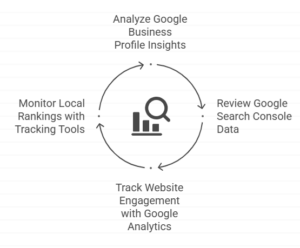
Google Business Profile Insights:
- Search queries: What terms bring up your profile
- Views: How many people see your listing
- Actions: Calls, direction requests, website clicks
- Photos: Customer photo uploads
Google Analytics:
- Organic traffic by location: Filter traffic from your target boroughs
- Landing page performance: Which borough pages get the most visits
- Conversions: Phone calls, form submissions, direction clicks
Google Search Console:
- Keyword rankings: Track positions for borough-specific terms
- Click-through rates: How often people click your result
- Impressions: How often you appear in search results
Local rank tracking tools:
- BrightLocal
- Whitespark
- Local Falcon
- GMB Everywhere
Track your ranking for key terms like “pharmacy [borough]” and “chemist [postcode]” every week.
How Often Should You Check Your Rankings?
Check GBP Insights weekly. Review website analytics monthly. Run ranking reports fortnightly.
What Technical Issues Harm Local SEO?
Some technical issues harm local SEO. Fix these common problems ASAP:
Broken structured data: Test your schema with Google’s Rich Results Test. Errors prevent rich snippets.
Slow mobile site: Use Google PageSpeed Insights. Aim for scores above 85.
Duplicate content: Don’t copy and paste the same content across borough pages. Write unique content for each area.
Missing alt text: Add descriptions to images: “Swinton Pharmacy shopfront on High Street NW1.”
Incorrect robots.txt: Don’t accidentally block Googlebot from crawling your site.
Poor internal linking: Link borough pages to related service pages and back to your homepage.
How to Handle Multiple Pharmacy Locations
Many pharmacies operate several branches across London boroughs, and you could be one of them, too.

Should Each Location Have Its Own GBP?
Yes. Create a separate, verified GBP for each physical location. Never use one profile for multiple addresses.
How to Structure Multiple Location Websites
Two approaches work:
Option 1 – Location pages: One website with individual pages for each branch:
- yourpharmacy.co.uk/locations/camden-nw1
- yourpharmacy.co.uk/locations/islington-n1
- yourpharmacy.co.uk/locations/hackney-e8
Option 2 – Store locator: One website with an interactive store finder where customers enter their postcode to find their nearest branch.
Use Option 1 if you have 2-5 locations. Use Option 2 if you have 6 or more locations.
What Schema Markup Do Multi-Location Pharmacies Need?
Model your schema as one parent organisation entity and multiple branch entities. Each location page should have:
- Its own LocalBusiness/Pharmacy schema
- A parentOrganization property linking to your main brand
- Unique address, phone, and geo-coordinates
- Individual opening hours and services
The homepage should list branches using the subOrganization property.
Your Local SEO Checklist for London Borough Pharmacies
Use this checklist to ensure complete optimisation:
Google Business Profile:
☐ Claimed and verified
☐ Accurate NAP (name, address, phone)
☐ Correct primary and secondary categories
☐ Complete business description with borough mentions
☐ All services listed
☐ Attributes added (accessibility, parking, etc.)
☐ Opening hours including bank holidays
☐ High-quality photos uploaded
☐ Weekly Google Posts scheduled
Website Structure:
☐ Dedicated landing page for each borough served
☐ Borough name in H1 headings
☐ Local landmarks and transport links mentioned
☐ Neighbourhood-specific content
☐ LocalBusiness and Pharmacy schema added
☐ Geo-coordinates included in schema
☐ Mobile-responsive design
☐ Fast loading speed (under 3 seconds)
Content & Keywords:
☐ Borough + postcode keywords in page titles
☐ LSI keywords used naturally
☐ Service-specific content created
☐ Local guides and FAQs published
☐ Transport and accessibility information included
Reviews & Reputation:
☐ Review the request process in place
☐ QR codes or links shared with customers
☐ Responding to all reviews within 24 hours
☐ Addressing negative feedback professionally
Citations & Directories:
☐ Listed on NHS Find a Pharmacy
☐ Listed on PharmData
☐ Listed on Yell, Bing Places, Apple Maps
☐ NAP consistent across all directories
☐ Listed on borough council directories
Link Building:
☐ Joined local business associations
☐ Sponsoring community events
☐ Featured in local news or blogs
☐ Partnered with local organisations
Monitoring & Maintenance:
☐ Tracking GBP Insights weekly
☐ Monitoring keyword rankings fortnightly
☐ Reviewing Google Analytics monthly
☐ Updating content seasonally
☐ Adding new photos monthly
☐ Testing schema markup quarterly
Local SEO isn’t a one-time setup. Google’s algorithm changes. Competitors improve. New services launch. Treat this as ongoing work, not a finished project.
Borough by borough, postcode by postcode, your pharmacy can dominate local search. The work pays off in phone calls, prescription transfers, and customers walking through your door saying, “I found you on Google.”
Dive deeper: The Ultimate Guide to Healthcare SEO in the UK: Strategy for Clinics & Pharmacies
Ready to dominate the map pack in your London borough?
Book a consultation with us today. We’ll analyse your current local SEO, identify quick wins in your borough, and create a custom strategy to put your pharmacy first in local searches.