

Your local business deserves to be found. When someone nearby searches for what you offer, your profile should appear at the top of Google Maps and local search results. That’s where Google Business Profile comes in.
Google Business Profile (GBP), formerly Google My Business (GMB), is a free tool that lets you control how your business appears on Google Search and Google Maps.
According to Search Engine Land, with 53% of all website traffic coming from organic search, having a well-managed profile can be the difference between being discovered and overlooked.
This guide will show you how to set up, optimise, and maintain your profile to attract more local customers.
What You’ll Learn
In this guide, we’ll cover the ultimate guide to Google Business Profile Optimisation:
- How to claim and verify your business listing correctly
- Essential profile elements that impact local rankings
- Content strategies that keep your profile active and engaging
- Review management techniques that build credibility
- Advanced features that give you a competitive edge
- Technical optimization that connects your profile to your website
- Industry-specific tactics for different business types
- Measurement strategies to track your success
Let’s start with the fundamentals.
What is Google Business Profile?
Google Business Profile is a free tool that helps people find your business on Google Search and Google Maps. It helps Google understand who you are and who you serve, showing accurate contact details, opening hours, and genuine reviews, building trust quickly. This strengthens local visibility and drives more calls, visits, and enquiries.
Here’s what makes this tool valuable:
According to BrightLocal research, 97% of consumers read online reviews of local businesses, and most start their searches on Google. If your profile isn’t optimised, you’re essentially invisible to these searchers.
How Google Determines Local Rankings
Google uses three main factors to rank local businesses:
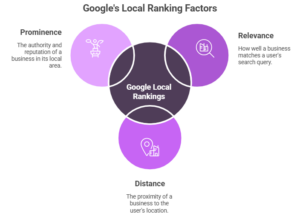
Relevance
Google measures how well your profile matches what someone is searching for. If you run a pizza restaurant and someone searches “pizza near me,” Google checks your business category, description, and other profile details to determine relevance.
Distance
Google considers how far your business is from the searcher or the location term they used. You can’t change your physical location, but you can optimise for the areas you serve nearby.
Prominence
Google evaluates how well-known your business is. Google looks at information across the web – your reviews, ratings, backlinks, articles about your business, and your overall online presence.
How to Create a Google Business Profile: A Simple Set Up Guide
Creating your Google Business Profile is simple, but many businesses get it wrong. A single mistake can stop customers from finding you. Follow these 3 simple steps to ensure your business appears correctly in local searches across your location.
Step 1: Create or Claim Your GBP
Search for your business name on Google Maps. If a listing already exists, you’ll see an “Own this business?” link or “Claim this business” button. Click it to start the claim process.
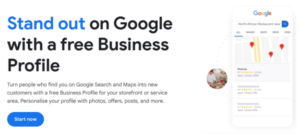
If no listing exists, go to Google Business Profile and click “Start now” to create a new profile.
For multiple locations, you can manage them from a single account through Business Groups. This makes it easier if you’re handling multiple storefronts or an agency managing client profiles.
Step 2: Add Your Business Details
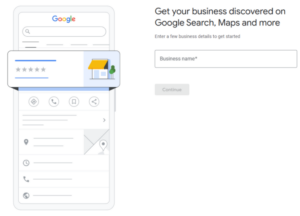
1. Enter your business name so Google can identify you precisely.
2. Choose your business type so customers understand what you offer.
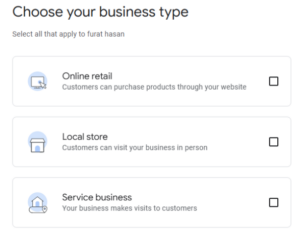
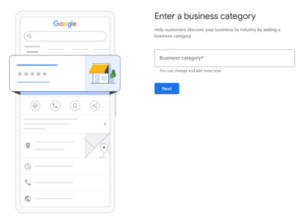
3. Add your business category. If you run a local store, e.g., a shop or service business, select the correct category.
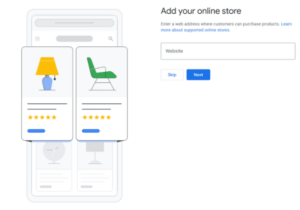
If you run an online store, add your website link instead.
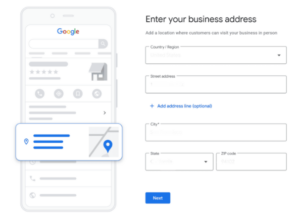
4. If you chose a local store or retail, add your business address. If you do not have a public address, enter your service area instead.
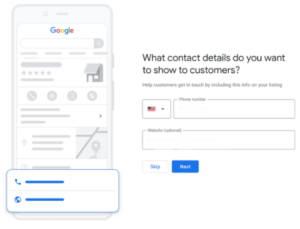
5. Add your phone number and website so people can contact you without delay.
Step 3: Verify Your Business
Google offers several verification options:
- Postcard verification: Google mails a postcard with a verification code to your business address (the most common method)
- Phone verification: Receive a code via automated call or text
- Email verification: Get a code sent to your business email
- Video verification: Record proof of your location and business operations
- Instant verification: Available if you’ve already verified your business in Google Search Console
Verification typically takes 5-7 days for postcards. Once verified, you gain full editing capabilities, and your profile becomes visible in local search results.
Caution: Follow Google’s Guidelines
Google suspends profiles that violate its guidelines. Common violations include:
- Adding keywords to your business name
- Using a virtual office or residential address when you don’t meet customers there
- Creating multiple listings for one location
- Stuffing your description with keywords
- Representing yourself as another business
Read Google’s official guidelines before making changes. A suspended profile can take weeks to restore and damages your local visibility during that time.
What Are the Core Elements of GBP And How to Optimise Them?
These elements form the foundation of your profile. Get them right, and you’ll rank higher in local searches.
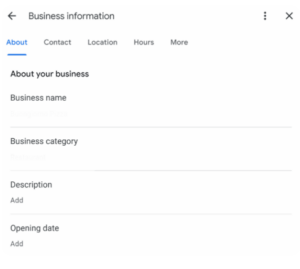
Business Name
Use your actual business name – nothing more. Google’s algorithm now penalizes keyword-stuffed names like “Joe’s Plumbing | Emergency Plumber Seattle.”
If your legal name differs from your DBA (doing business as), use the name customers know you by. For example, if you’re legally “Smith & Sons LLC” but everyone calls you “Smith’s Hardware,” use the latter.
Category Selection
Your primary category tells Google what your business is. Choose carefully – this significantly impacts which searches you appear in.
Start typing your business type and select from Google’s list. For a coffee shop, “Coffee shop” is your primary category. Don’t choose “Restaurant” or “Cafe” unless they better describe what you do.
Add up to nine additional categories for services you offer. A coffee shop might add “Bakery,” “Breakfast restaurant,” and “Wi-Fi spot.” Each category helps you appear in more relevant searches.
Review your categories quarterly. As your business evolves or Google adds new options, your selections should adapt.
Business Description
You have 750 characters to describe what you do. Focus on what makes you different and the problems you solve.
Good description:
“Crazygraph is an AI SEO agency founded in 2022, based in Covent Garden, London, UK. We help businesses grow through SEO, AI SEO, PPC, press release distribution, and social media marketing.
Our work is driven by search intent, data, and performance. We use AI-powered optimisation and a proven SEO strategy to increase rankings, traffic, and conversions. Every campaign is built for measurable growth.
Crazygraph works with clients across the USA, UK, Canada, Australia, and worldwide. Learn more at https://crazygraph.co/ or call 07490349117.”
Avoid:
- Promotional language (“best,” “number one,” “award-winning”)
- Keyword stuffing
- ALL CAPS or special characters
- URLs or phone numbers
- Sale announcements
Write conversationally. Imagine explaining your business to someone who just walked in.
NAP Consistency
NAP stands for Name, Address, Phone number. These three elements must match exactly across your website, social profiles, and directory listings.
Why? Google cross-references information from multiple sources. Inconsistencies signal that information might be unreliable, which can hurt your rankings.
Use tools like Semrush’s Listing Management or Moz Local to audit your NAP across the web. Fix any discrepancies you find.
Enter the correct and complete address. For service area businesses without storefronts, you can hide your address. Just ensure you specify the areas you serve.
Use a local phone number that connects straight to your team. Callers expect real help. They want quick answers about availability, pricing, and services.
Hours of Operation
Keep your hours current. Google shows whether you’re currently open, and outdated hours frustrate potential customers.
Set regular hours for each day of the week. Add special hours for holidays – Google lets you specify temporary hours for specific dates. This prevents confusion when you close early on Christmas Eve or open late on Mondays.
Some categories let you add “More hours” for specific departments. A grocery store might list pharmacy hours separately from main store hours.
Business Attributes
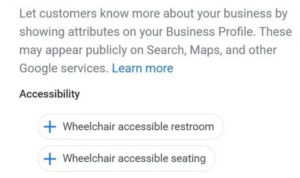
Attributes are profile features that describe your business. Examples include:
- “Women-led”
- “LGBTQ+ friendly”
- “Wheelchair accessible entrance”
- “Free Wi-Fi”
- “Outdoor seating”
Available attributes depend on your business category. A restaurant sees different options than a law office.
Enable all accurate attributes. They help searchers filter results and can influence click-through rates. According to BrightLocal research, businesses with complete profile information receive 70% more location visits.
What Are the Content and Engagement Features?
Active profiles rank better and attract more customers. These features keep your profile fresh and engaging.
Google Posts Strategy
Posts appear in your profile and can include text, photos, and action buttons. Think of them as mini social media updates.
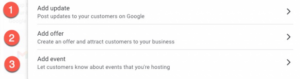
Create posts to:
- Announce new products or services
- Share special offers
- Promote upcoming events
- Highlight recent blog content
Posts typically expire after seven days unless you set a specific end date. To maintain an active presence, publish at least one post per week.
Keep text under 100 words. Most posts in search results are truncated after 100 characters, so front-load important information.
Include a call-to-action button: Learn more, Sign up, Order online, or Book now – link to a relevant page on your website with UTM parameters to track traffic.
Photo and Video Management
Profiles with photos receive 42% more requests for directions and 35% more website clicks than those without.
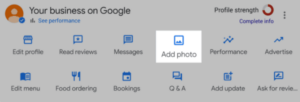
Upload these photo types:
Cover photo (1080 x 608 pixels): This appears at the top of your profile. Choose an image that represents your business – your storefront, a signature product, or your team.
Profile photo (250 x 250 pixels): Usually your logo. It appears in search results and on Google Maps.
Interior and exterior photos: Show your space. Restaurants should photograph their dining area. Retail stores should capture product displays.
Product photos: Highlight what you sell. Use clean backgrounds and good lighting.
Team photos: Put faces to names. People trust businesses where they recognize the staff.
Add captions to describe what each photo shows. Upload new photos monthly to keep your profile up to date.
Videos can showcase your business in action. Keep them under 30 seconds and ensure the first few frames grab attention.
Product and Service Listings
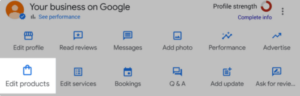
Retail businesses can add products directly to their profile. Each product includes:
- Name
- Category
- Price
- Description (up to 1,000 characters)
- Photo
- Link to product page
Create collections to organize products by type. A bookstore might have collections for “New Releases,” “Staff Picks,” and “Local Authors.”
Service businesses can list services instead. A landscaping company might list “Lawn Maintenance,” “Tree Trimming,” and “Irrigation Installation” with descriptions and pricing ranges.
Q&A Section Management
Anyone can ask questions on your profile. Anyone can answer them, including competitors.
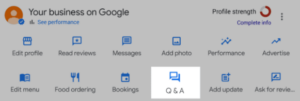
Take control by:
- Asking questions yourself: Use a personal Google account to post common questions, then answer them from your business account. This lets you control the information displayed.
- Monitoring new questions: Check weekly for questions from real customers. Answer within 24 hours.
- Correcting wrong answers: If someone posts incorrect information, provide the right answer and report the misleading response.
Common questions to pre-populate:
- “Do you offer [specific service]?”
- “What are your parking options?”
- “Do you accept [payment method]?”
- “Are you wheelchair accessible?”
How to Manage Reviews of Your Google Business Profile
Reviews influence both rankings and customer decisions. Here’s how to get more reviews and handle the ones you receive.
How to Get More Reviews
You can’t offer incentives for reviews – Google prohibits it. But you can make it easy for satisfied customers to leave feedback.
Create a review link from your profile:
- Click “Get more reviews” in your dashboard
- Copy the short URL provided
- Share it via email, text, or in person
Add the link to:
- Email signatures
- Invoice footers
- Receipts
- Follow-up emails after service completion
Train staff to mention reviews during positive interactions: “We’d appreciate your feedback on Google if you have a moment.” Keep it casual, not pushy.
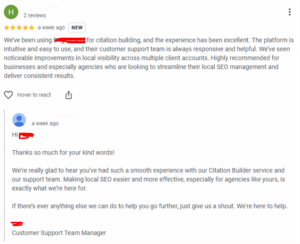
How Reply to Reviews
Respond to every review – positive and negative. Responses show potential customers that you value feedback and handle problems professionally.
For positive reviews, thank the reviewer by name and mention something specific they said:
“Thanks, Maria! We’re glad you enjoyed the espresso blend. Our baristas love crafting the perfect cup.”
For negative reviews, follow this approach:
- Acknowledge the problem: “I’m sorry your order was delayed.”
- Take responsibility: “We should have communicated better about the wait time.”
- Offer a solution: “I’d like to make this right. Please call me at [number] so we can discuss options.”
- Keep it brief: Two to three sentences are enough.
Never argue publicly. If a review is fake or violates Google’s policies, report it rather than responding.
Response time matters. 53% of consumers expect responses to negative reviews within a week, and businesses that respond to reviews are perceived as 1.7 times more trustworthy.
Advanced Features of Google Business Profile
These features give you a competitive advantage and provide deeper engagement opportunities.
Messaging Setup
Enable messaging so customers can contact you directly from your profile. Messages appear in the Google Maps app or through business messages in Search.
Before enabling, ensure you can respond quickly. 89% of consumers expect responses to inquiries within 24 hours.
Set up automated responses for common questions. You can also integrate WhatsApp if you prefer managing messages there.
Turn off messaging if you can’t maintain responsiveness. An ignored message frustrates potential customers more than no messaging option at all.
Booking and Appointments
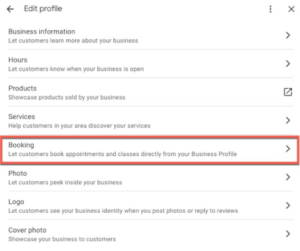
Connect your scheduling system directly to your profile. Supported integrations include:
- Calendly
- Square Appointments
- Booksy
- Setmore
- Acuity Scheduling
Once connected, a “Book” button appears in your profile. Customers can schedule appointments without leaving Google.
This feature works well for:
- Healthcare providers
- Salons and spas
- Professional services
- Home service businesses
Profile Insights
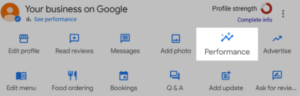
Your profile dashboard shows how people find and interact with your listing. Key metrics include:
Search queries: See what terms people used before finding your profile. This reveals which keywords you’re ranking for and which searches lead to the most actions.
Actions: Track how many people called, visited your website, or requested directions from your profile.
Direction requests: Shows where customers are coming from geographically.
Photo views: Compare your photos’ performance to similar businesses in your area.
Check insights monthly. Look for trends – if calls spike on certain days, ensure you’re staffed to handle them. If website clicks are low, improve your posts to drive more traffic.
How to Optimise Your GBP Connections
Your profile doesn’t exist in isolation. Connect it to your other online properties for maximum impact.
Structured Data Implementation
Add the LocalBusiness schema to your website. This structured data helps Google understand your business information and connects it to your profile.
Basic schema includes:
- Business name
- Address
- Phone number
- Business hours
- Accepted payment methods
- Price range
Use Google’s Structured Data Markup Helper to generate code. Test it with Google’s Rich Results Test to ensure it’s implemented correctly.
Website Alignment
Your website should mirror the information in your profile. Create a dedicated contact page that includes:
- Your business name (matching your profile exactly)
- Complete address with schema markup
- Phone number with click-to-call functionality
- Embedded Google Map showing your location
- Business hours
- Directions and parking information
For multi-location businesses, create individual location pages. Each page should have unique content describing that specific location, its staff, and the services available there.
This reinforces your NAP consistency and helps Google verify that your profile information is accurate.
How to Integrate Local SEO into Your Google Business Profile
Your profile works best when integrated into a broader local SEO strategy. These tactics amplify your profile’s impact.
Citation Building
Citations are mentions of your business name, address, and phone number on other websites. They serve as a vote of confidence in your business information.
Start with these platforms:
- Yelp
- Better Business Bureau
- Yellow Pages
- Apple Maps
- Industry-specific directories
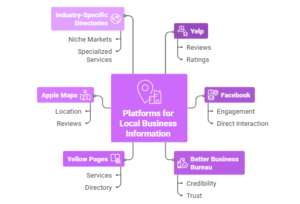
Ensure your NAP matches across all citations. Inconsistencies dilute the signal and can confuse Google.
According to Moz’s Local Search Ranking Factors study, citations account for approximately 10% of local pack ranking factors.
Local Link Building
Links from other local websites boost your profile’s prominence. Target:
- Local news websites (get featured in community stories)
- Chamber of Commerce
- Local business associations
- Community event pages
- Local blogs and influencers
- School or university websites
- Supplier websites
The best links come from genuine relationships and newsworthy activities. Sponsor a local event, host a workshop, or contribute expert commentary to local journalists.
On-Page Optimization
Your website should target local search terms. Include your city or region in:
- Page titles
- H1 headers
- Body content (naturally, not stuffed)
- Image alt text
- URL structures
Create location-specific content, such as neighborhood guides, local event roundups, or area-specific resources. This helps you rank for local searches and establishes your expertise in the community.
Industry-Specific Strategies for Google Business Profile
Different business types need different approaches.
Restaurants and Food Services
Focus on:
- High-quality food photos (upload at least 20)
- Complete menu information
- Popular dishes section
- Table reservation integration
- Special attributes (outdoor seating, takeout, delivery)
- Posts about daily specials and seasonal items
Service-Based Businesses
Emphasize:
- Service area coverage (be specific about neighborhoods)
- Before/after photos
- Team credentials
- Emergency availability (if applicable)
- Response time expectations
- Service-specific posts
Retail Stores
Highlight:
- Product categories in your description
- In-stock product uploads
- Store interior photos
- Sale announcements via posts
- Shopping attributes (in-store pickup, curbside)
- Loyalty program information
Healthcare Providers
Prioritize:
- Accepted insurance information (in description)
- New patient acceptance status
- Accessibility features
- Staff credentials
- Appointment booking
- Health and safety measures
Dive deeper: How to Optimise Google Business Profile for Your Pharmacies and Clinics
How to Perform Ongoing Maintenance of Google Business Profile
Set up this maintenance schedule to keep your profile performing well.
Weekly tasks:
- Check and respond to new reviews
- Monitor Q&A section
- Create one post
- Review insights for trends
Monthly tasks:
- Upload new photos
- Verify hours are correct
- Check for duplicate listings
- Update seasonal information
- Review and adjust categories if needed
- Analyze performance metrics
Quarterly tasks:
- Audit NAP consistency across the web
- Test all links and buttons
- Compare performance to competitors
- Update business description if offerings changed
- Review attribute selections
How to Measure the Success of Your GBP
Track these metrics to understand your profile’s impact:
| Metric | What It Tells You | How to Improve |
| Search impressions | How often your profile appears in searches | Optimise categories and descriptions |
| Profile views | How many people view your profile | Improve search visibility and ranking |
| Website clicks | Traffic driven to your site | Use compelling posts and updated info |
| Direction requests | How many people are visiting | Maintain accurate location and hours |
| Phone calls | Direct inquiry volume | Keep phone number visible and current |
| Reviews | Customer satisfaction and trust | Request feedback and provide excellent service |
Set quarterly goals for each metric. Compare your performance to previous periods and, when possible, to competitors.
Use Google Analytics to track conversions from profile traffic. Set up UTM parameters on your profile links to see which actions drive the most valuable visitors.
Moving Forward
A well-managed profile increases your local visibility, drives more traffic to your business, and generates leads without paid advertising. The businesses that rank highest in local search consistently maintain and update their profiles.
Start by verifying your profile if you haven’t already. Then work through the core elements – name, categories, description, and hours. Add photos and respond to reviews. Once you have the basics right, incorporate advanced features and integrate your profile into your broader local marketing efforts.
Google updates its local algorithm regularly. Stay informed about changes by following Google’s Business Profile Help Community and testing new features as they roll out.
Your competitors are optimizing their profiles. Make sure yours stands out.