



Most local businesses have a keyword problem. They don’t know it yet.
They open Google Keyword Planner, type in their job title, add a city name, and call it a day. “Plumber Austin.” Done. SEO sorted. Back to work.
The problem? Their customers are not typing that.
They’re typing “toilet won’t stop running, Austin,” “water heater making loud noise,” or “emergency plumber open now near me.” Real queries from real people with real problems at real inconvenient hours. And most local businesses are completely invisible for those searches.
46% of all Google searches have local intent. That’s a massive pool of potential customers. Most of them will never find your website because you optimised for the keyword you think you deserve, not the one your customer actually types.
This guide fixes that.
Here’s what you’ll learn:
- What local keyword research actually is (and why most businesses approach it backwards)
- The 3 types of local keywords every business needs
- A 6-step process to find terms your customers actually search for
- Which free tools do the job well
- The mistakes that quietly kill local rankings
- How to know if it’s working
Let’s get into it.
What Is Local Keyword Research?
Local keyword research is the process of identifying the exact search terms people use to find products or services near them.
It sounds simple. It mostly is. The complication arises when businesses optimise for how they describe their own services rather than how customers describe their problems.
A dentist might want to rank for “cosmetic dentistry services.” Their patient is searching “how to fix a chipped tooth near me.” Not the same thing.
Good research closes that gap. It gives you a map of what your customers are asking Google so that you can show up at exactly the right moment.
The 3 Types of Local Keywords You Need to Target
Not all local keywords behave the same way. Understanding the three types tells you what to create and where it should live on your site.
1. Geo-Modified Keywords
These include a specific location in the query. “HVAC repair Dallas,” “best sushi Chicago downtown,” “divorce lawyer near downtown Seattle.” The searcher knows where they are and what they want. Your job is to have a page that matches.
2. Implicit Local Keywords
No location in the query, but Google knows the person wants something nearby. “Emergency plumber,” “coffee shop open now,” “dentist accepting new patients” all trigger local results without a city name. Google uses device location and IP to infer intent.
Near me searches have grown by more than 500% in recent years, and they rarely include a specific city. If you only optimise for geo-modified terms, you’re leaving a huge slice of high-intent traffic on the table.
3. Service + Location Landing Page Keywords
These are built for pages targeting specific service-and-city combinations: “roof repair Portland OR,” “dog groomer Brooklyn,” “tax accountant for freelancers Austin.” Each one deserves a dedicated page. One page, one primary keyword cluster. No exceptions.
| Keyword Type | Example | Where It Tends to Rank |
| Geo-modified | “plumber in Denver” | Organic + Local Pack |
| Implicit local | “emergency plumber near me” | Local Pack (map) |
| Service + location | “AC installation Phoenix AZ” | Organic results |
How to Do Local Keyword Research: Step by Step
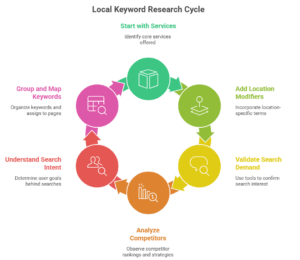
Step 1: Start With Services, Not Keywords
Before you open any tool, write down every service you offer. All of them.
This sounds obvious. It gets skipped constantly.
If you run a plumbing business, don’t just write “plumbing.” Write down unblocking the drain, boiler repair, boiler installation, burst pipe repair, radiator fitting, and every single thing you actually do. Each service is a potential page. Each page is a potential cluster of keywords worth ranking for.
Once you have the list, flip the perspective. Ask: “What would a stressed homeowner type at 11 pm when this thing breaks?” That mental shift is where useful research actually starts.
Step 2: Add Location Modifiers
Now combine those services with locations. Not just your main city. Think neighbourhoods, surrounding suburbs, nearby towns, county names, and areas you regularly serve.
The formula is simple: [Service] + [Location] = Local Keyword
But go deeper than one city. A customer in outer Austin might search “plumber Pflugerville TX.” Someone in Brooklyn might type “electrician Bay Ridge.” If you only target the main metro, you’re competing against everyone while ignoring searches you could own outright.
Also worth noting: you won’t literally optimise a page for the keyword phrase “plumber near me”. But understanding that Google treats proximity as a ranking factor should shape how you structure and localise your pages. The voice search and “near me” optimisation guide goes deep on this for mobile-first searches specifically.
Step 3: Use Free Tools to Validate Real Search Demand
Paid tools like Ahrefs and Semrush are useful. They’re also completely optional for this step.
Here’s what works for free:
Google Search autocomplete. Type your service into Google and watch the suggestions. Those are real searches from real people. Write them down.
People Also Ask. Scroll down the results page. That box is a free keyword research tool hiding in plain sight. Every question listed is a real query worth targeting, often for blog posts or FAQ content.
Google Keyword Planner. Free with a Google Ads account. Enter your services and location, and it shows monthly search volume estimates. It tells you whether there’s actual demand before you invest time building a page around something nobody searches for.
Google Search Console. If your site is live, this is your most valuable free resource. It shows the exact queries people used to find your site, along with your average ranking position for each. Look for terms where you’re sitting between positions 8 and 20. Those are your easiest opportunities to move up with targeted improvements.
Google Trends. Useful for comparing demand across cities or spotting seasonal patterns. A roofing company might find that “roof repair” spikes after hail season. That shapes when to publish and promote content.
Step 4: See What Your Local Competitors Are Ranking For
Search your main keyword. Look at who shows up in both the Local Pack and the organic results. These are your actual competitors, not the national directories.
Pick two or three. Go to their websites. Read their service pages, their navigation, their title tags. You’ll find keyword ideas you hadn’t considered just by reading how they describe their work.
If you use Ahrefs Webmaster Tools (free for your own domain), you can also see which pages on competing sites pull the most organic traffic. That tells you which service pages to prioritise first.
Step 5: Analyse Search Intent Before You Build Anything
Finding the keyword is half the job. Understanding what type of content Google wants to rank for is the other half.
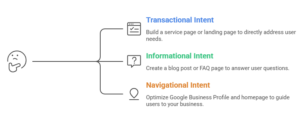
A simple framework:
- Transactional intent (“hire plumber Austin,” “book HVAC service today”): Build a service page or landing page
- Informational intent (“how much does boiler repair cost Austin,” “what to do when pipes burst”): Build a blog post or FAQ page
- Navigational intent (“Mike’s Plumbing Austin reviews”): Optimise your Google Business Profile and homepage
The fastest way to identify intent is to search the keyword yourself. Look at what Google is already ranking on page one. If it’s all service pages, build a service page. If it’s blog posts, write a blog post. Google is telling you exactly what it wants to show.
This also connects to what content you’re publishing and why. Knowing intent is what separates pages that rank from pages that take up server space. Your local SEO content strategy should be built on this foundation, not just on what topics you feel like covering.
Step 6: Group Keywords and Map Them to Pages
Once you have a list, organise it.
One primary keyword cluster per page. Multiple keywords targeting the same intent belong on the same page. Different intents get different pages. Mixing them causes keyword cannibalisation, where your own pages compete against each other and neither one wins.
A basic spreadsheet is all you need:
| Page | Primary Keyword | Supporting Keywords | Intent | Est. Monthly Volume |
| /plumbing-austin | plumber Austin TX | Austin plumbing service | Transactional | 480 |
| /drain-unblocking-austin | drain unblocking Austin | blocked drain Austin | Transactional | 210 |
| /boiler-repair-cost-austin | boiler repair cost Austin | average boiler repair price Austin | Informational | 90 |
If you serve multiple locations, each city gets its own page. Don’t duplicate content and swap the city name. Customise it. Mention local context, seasons, and landmarks where relevant. Google can tell the difference between a real local page and a template with a city name dropped in. From a full visibility strategy, the local SEO strategy covers the bigger picture.
5 Mistakes That Quietly Kill Local Rankings
- Targeting keywords with no local intent. “What causes a boiler to make noise” is purely informational. It won’t bring local customers to your door. Know what you’re optimising for and why.
- Ignoring implicit local searches. Proximity-based and “near me” behaviour is growing fast. If your pages have no local signals beyond one city name in the footer, you’re not set up to capture it.
- Only targeting the main city. Surrounding suburbs and neighbourhoods often have less competition and real search volume. They’re worth going after, especially if you already serve those areas.
- Stuffing location terms unnaturally. Dropping “Austin Texas plumber Austin” across a page five times doesn’t work. It also reads like your website was written by a robot having a difficult afternoon. Write naturally. Mention your location contextually.
- Never revisit your keyword map. You moved. You added a service. You dropped one. Your keyword strategy needs to match what your business actually does today, not what it did when you first set this up.
How to Know Your Keywords Are Working
You don’t need a paid rank tracker to start. Two free tools cover the basics well.
Google Search Console shows which queries are driving impressions and clicks to each page. Check it monthly. Look for keywords climbing in position. Look for pages with high impressions but low click-through rates, which often indicate that the title tag or meta description needs work.
Google Business Profile Insights shows what search terms people used to find your listing in the map results. This is separate from your website rankings and tells you specifically how you’re performing in the Local Pack.
As you grow, tools like BrightLocal and Whitespark offer more granular local rank tracking by city and zip code. For most businesses just starting, Search Console and GBP Insights are more than enough to get started.
Conclusion
The businesses ranking at the top of local search aren’t guessing. They’ve done the work of understanding how their customers actually search, not how they would describe their own services.
That gap between “how I describe my business” and “how my customer describes their problem” is where most local SEO falls apart.
Six steps, mostly free tools, a keyword map you can build in an afternoon. The rankings follow the work.