

Most businesses burn through thousands of dollars on Google Ads each month. The traffic stops the moment your budget runs out.
There’s a better way.
Local SEO delivers qualified leads to your business 24/7 without ongoing ad spend. According to Google, 76% of people who search for something nearby visit a business within 24 hours. And 28% of those searches result in a purchase.
If you’re not showing up in local search, you’re missing out.
This guide shows you how to rank in Google’s map pack, attract high-intent customers, and build sustainable visibility – step by step.
Here’s what we’ll cover:
- What local SEO is and why it outperforms paid advertising
- How Google ranks local businesses (and the signals that matter most)
- Setting up and optimizing your Google Business Profile to maximize visibility
- Finding keywords that your local customers actually use
- Building citations that boost your credibility and rankings
- Earning and managing reviews that convert browsers into buyers
- Creating location-optimized website content that ranks
- Generating local backlinks from trusted sources
- Measuring performance and tracking what actually drives revenue
Let’s get started.
What Is Local SEO & Why It Matters for Your Business
Local SEO helps your business appear in search results when someone nearby searches for what you offer.
When someone searches for “barber Boston” or “plumber near me,” Google shows two types of results – first, the map pack, which consists of three business listings with a map. Second, the organic results are below that.
You can rank in both places.
The difference between local SEO and traditional SEO comes down to geography. Traditional SEO targets a broad global audience. Local SEO focuses on customers in your specific area.
For example, a search for “how to fix a leaky faucet” shows instructional content from anywhere. But “emergency plumber Chicago” shows businesses within driving distance of the searcher.
Why Local SEO Beats Paid Advertising
Paid ads stop working the moment you stop paying. Local SEO keeps working.
Here’s the reality:
The average small business spends $1,000-$10,000 per month on Google Ads. Stop paying, and your traffic disappears overnight.
Local SEO requires an upfront investment of time and resources. For most small businesses, you can expect to dedicate 5-10 hours per week and a budget of $2,000 to $6,000 over the first three months for core tasks such as setting up your Google Business Profile, optimizing your website, and building initial citations and content. Most businesses begin seeing measurable results within 3 to 6 months, although highly competitive markets may take longer.
If you’re a larger company, have multiple locations, or work with an agency, your investment and timetables may be higher. Larger footprints often require more comprehensive strategies, dedicated teams, and a longer ramp-up period – sometimes 6 to 12 months – to achieve significant traction. But once you rank, you generate traffic without ongoing costs. Your rankings compound over time as you build more reviews, citations, and content.
Beyond cost, there’s trust. According to BrightEdge, organic search results get 53% of all website traffic. Users trust organic listings more than paid ads. The top organic position gets a 28.5% click-through rate, while paid ads average just 3-5%.
That trust translates to revenue. Studies show that 88% of consumers trust online reviews as much as personal recommendations.
When your business ranks organically with strong reviews, you’re not just visible – you’re credible.
Who Should You Focus on Local SEO?
Any business that serves customers in a specific geographic area benefits from local SEO.
This includes service-area businesses like plumbers, electricians, and landscapers. These businesses travel to customers but need local visibility to generate leads.
Brick-and-mortar stores depend on foot traffic. Ranking in local search drives store visits and phone calls.
Multi-location companies need location-specific strategies to rank in each market they serve. Each location requires its own Google Business Profile and optimized landing page.
Professional services – lawyers, accountants, consultants – compete in local markets where reputation and proximity matter.
If customers search for your service plus a location, you need local SEO.
How Local SEO Works: The Complete Ecosystem
Google uses different ranking factors for local searches than it does for traditional organic searches.
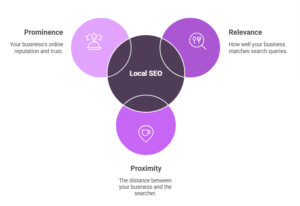
When Google detects local intent in a query, it evaluates businesses based on three main factors: relevance, proximity, and prominence.
Relevance measures how well your business matches what someone is searching for. If you’re a pizza restaurant, you’re highly relevant for “pizza near me” but not for “sushi delivery.”
Proximity considers how far your business is from the searcher or the location mentioned in their search. A coffee shop two blocks away will usually outrank one across town.
Prominence reflects how well-known and trusted your business is. Google evaluates this through reviews, citations, backlinks, and overall online presence.
The Three Pillars of Local Rankings
According to Whitespark’s Local Search Ranking Factors survey, these are the signals that matter most:
Google Business Profile signals account for roughly 32% of ranking factors. This includes your business name, categories, description, attributes, photos, and user engagement metrics.
On-page signals represent about 15% of ranking factors. This covers your website’s title tags, content, internal linking, mobile optimization, and schema markup.
Link signals make up approximately 8% of ranking factors. Quality backlinks from local sources tell Google your business is trusted in your community.
Review signals, citation signals, and behavioral signals round out the remaining factors.
The Two Types of Local Search Results
The Map Pack appears at the top of search results for local queries. It shows three business listings with a map.
This placement is prime real estate. These listings dominate visibility, especially on mobile devices, where users see the map pack before scrolling.
To appear here, you need a Google Business Profile. But having one isn’t enough – you need to optimize it and build supporting signals.
Local Organic Results appear below the map pack. These are traditional “blue link” listings that lead to websites.
Don’t ignore these results. They capture people doing deeper research before choosing a business. They often drive more qualified traffic because visitors are comparing options and reading detailed information.
Ranking here requires the same fundamentals as traditional SEO: quality content, proper on-page optimization, and backlinks.
Step 1: Claim & Optimize Your Google Business Profile
Your Google Business Profile is your most important asset for local visibility.
Without one, you cannot appear in the map pack. With an optimized profile, you can outrank competitors who invest more in paid ads.
According to Google, businesses with complete profiles are 70% more likely to attract location visits and 50% more likely to be considered for purchases.
Why Your GBP Is Your #1 Asset
Your profile appears in Google Search, Google Maps, and Google Shopping. It’s often the first thing potential customers see when they search for your business or services.
Every element you complete sends signals to Google about your relevance and credibility. An incomplete profile tells Google you’re not serious about serving customers.
Complete profiles get more visibility. They also convert better because they provide the information people need to contact you or visit your location.
How to Set Up Your Google Business Profile
If you haven’t created your profile yet, visit Google Business Profile and click “Start now.”
You’ll need to verify your business. Google typically sends a postcard with a verification code to your business address. This process takes 5-7 days.
Once verified, you can manage your profile and make it visible to searchers.
The 8 Must-Optimize GBP Elements
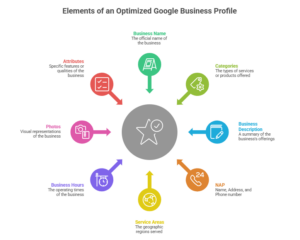
Business Name
Use your actual business name exactly as it appears on your signage and website. Don’t add keywords to your business name unless they’re truly part of your registered name.
Google penalizes keyword stuffing in business names.
“Joe’s Plumbing” is acceptable. “Joe’s Plumbing | Emergency Plumber | 24/7 Service” violates guidelines.
Categories
Choose one primary category that best describes what you do. This is mandatory and determines which searches you’re eligible to appear in.
Add secondary categories to expand your keyword coverage. A restaurant might use “Italian Restaurant” as its primary category, then add “Pizza Restaurant” and “Wine Bar” as secondary categories.
Google provides a predefined list. You can’t create custom categories, so choose the closest match to your offerings.
Business Description
Write a clear 750-character description of what you do, who you serve, and what makes you different.
Include your target keywords naturally. If you’re a dentist in Seattle, mention “dental services in Seattle” once. Don’t repeat it five times.
Focus on benefits, not features. Instead of “We have state-of-the-art equipment,” try “We provide pain-free dental care using the latest technology.”
NAP (Name, Address, Phone)
Your name, address, and phone number must match exactly across your website, GBP, and all other online listings.
Even small variations – like “Street” vs “St” or including a suite number in one place but not another – create confusion and hurt your rankings.
Service Areas
If you visit customers (like a plumber or electrician), set your service areas. List every city, ZIP code, or region you serve.
If you have a storefront that customers visit, set your address as the primary location. Don’t hide your address unless you operate from a home office and don’t want customers showing up unannounced.
Business Hours
Keep these accurate and updated. Include special hours for holidays and events.
Inaccurate hours frustrate customers and generate negative reviews. Both hurt your rankings.
Photos
Upload high-quality photos regularly. Google recommends at least three photos, but businesses with 100+ photos get more engagement.
Include photos of your storefront exterior and interior, your team, products, and services in action. Authentic photos perform better than stock images.
Attributes
Attributes let you highlight specific offerings, such as “wheelchair accessible,” “outdoor seating,” or “accepts credit cards.”
Select every relevant attribute. These details help Google match you with specific searches and help customers decide if you meet their needs.
Dive deeper: The Ultimate Growth Guide to Google Business Profile Optimisation for 2026
Step 2: Master Local Keyword Research
You need to find the local keywords that people in your area actually use when searching for your services.
Generic keywords like “plumber” won’t help you compete against national brands. You need location-specific variations that signal local intent.
The 4 Types of Local Keywords
Service + Location keywords combine what you do with where you do it. Examples: “dentist Chicago,” “pizza delivery Brooklyn,” “HVAC repair Phoenix.”
These keywords have clear local intent. They drive qualified traffic from people ready to hire or visit.
“Near Me” queries have exploded with mobile search. “Coffee shop near me” or “emergency vet near me” rely on the user’s device location.
You can’t always optimize directly for “near me” terms since there’s no specific location. But having a complete GBP and location signals on your website helps you appear for these searches.
Service-specific keywords target particular offerings. “Drain cleaning,” “root canal,” “oil change” – these describe exactly what someone needs.
Add your location to these terms for maximum impact: “drain cleaning Boston” or “root canal Manhattan.”
Comparison keywords indicate high purchase intent. “Best pizza in Seattle” or “top-rated dentist Portland” shows someone actively researching options.
These searchers are closer to making a decision. Ranking here with strong reviews can win their business.
Local Keyword Research Process
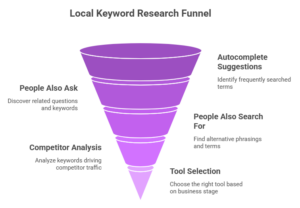
Start simple. Open Google and search for your service plus your location.
Look at the autocomplete suggestions. These show real searches people make frequently.
Check the “People Also Ask” box in search results. Each question represents a keyword opportunity. If you see “Does [service] cost in [city]?” consider creating content that answers it.
Scroll to the bottom of the results for “People also search for” suggestions. These reveal related terms and alternative phrasings.
Next, analyze competitors. Use a tool like Semrush’s Organic Research to see which keywords drive traffic to competing businesses in your area.
Choose your tool based on your business stage.
For beginners and small local businesses, Google Keyword Planner is available for free with a Google Ads account and provides valuable keyword ideas and volume estimates.
Google Trends can also help you compare keyword popularity over time in your region, making it a smart choice when you’re just starting and want to spot local opportunities without spending extra.
Ubersuggest offers a limited free version for basic keyword research, which works well for businesses ready to go beyond the basics with a small budget.
Growing businesses or those ready to invest more can benefit from paid tools like Semrush and Ahrefs.
These platforms offer advanced features, such as detailed competitor analysis, broader keyword databases, and multi-location tracking, making them a strong fit as your local SEO needs become more sophisticated.
For advanced marketers and agencies, tools like Semrush provide comprehensive research, keyword tracking, and local market insights that can help manage larger, multi-location campaigns efficiently.
These options make it possible to get started or grow your efforts, no matter your budget or level of experience.
Enter a competitor’s domain and review their top-ranking keywords. Filter for terms with your city or region name.
Look for keywords with local modifiers and decent search volume. Even 50-100 monthly searches can be valuable in a local niche.
Pay attention to value-driven terms like “affordable,” “24-hour,” “emergency,” or “best.” These signals have high intent and often convert better than generic searches.
Search Intent Mapping
Match each keyword to user intent.
Someone searching for “emergency plumber” needs immediate service. Your landing page should emphasize availability, quick response times, and easy contact options.
Someone searching “plumbing repair cost” is researching and comparing options. Content that explains pricing builds trust and positions you as transparent.
Create dedicated pages for high-value keywords. Don’t try to rank one page for every keyword variation.
Step 3: Build NAP Citations
Citations are online mentions of your business name, address, and phone number.
They appear on business directories, review sites, social media profiles, and local websites.
Citations serve two purposes. They help customers find your contact information. And they tell Google your business is legitimate and established.
Why Citation Consistency Matters
Google cross-references your information across the web. When your NAP matches across the board, it increases confidence in your listing.
When your information varies – different phone numbers, slight address differences – it creates uncertainty. Google may not show your listing as prominently because it can’t verify accuracy.
According to Brightlocal’s Local Search Ranking Factors study, citations account for about 6% of local pack rankings and 7% of localized organic rankings.
That might not sound like much. But in competitive markets, every percentage point counts.
Where to Build Citations
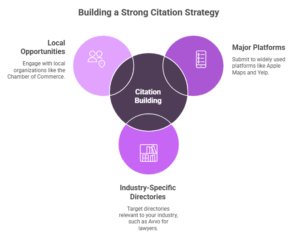
Start with data aggregators. In the United States, these include Data Axle, Localeze, and Foursquare.
These companies supply information to hundreds of other directories. Getting your information correct with them efficiently spreads accurate data across the web.
Next, submit to major platforms: Apple Maps, Bing Places, Yelp, Facebook, and Yellow Pages.
Then target industry-specific directories. Lawyers should be on Avvo and Justia. Restaurants need OpenTable and TripAdvisor. Home service businesses should be on Angi and HomeAdvisor.
Finally, pursue local opportunities through your Chamber of Commerce, the Better Business Bureau, and local business associations.
The Citation Building Process
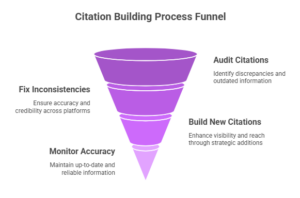
Audit existing citations
Search for your business name online. See where you’re already listed and whether the information is correct.
Tools like Semrush’s Listing Management can automate this process, scanning dozens of directories at once.
Fix inconsistencies
Update incorrect listings one by one. Claim your profiles on major platforms so you can control the information associated with them.
For citations you can’t edit directly (like mentions on news sites or local blogs), reach out to the site owner with a polite request to update your information.
Build new citations strategically
Don’t spam every directory you find. Focus on quality sources: high-authority directories, relevant industry sites, and trusted local platforms.
Each citation should include your exact NAP as it appears on your website and GBP. Include your website URL when possible.
Monitor ongoing accuracy
Set a quarterly reminder to check your citations: business information changes – new phone systems, office moves, expanded service areas.
Keep everything updated to maintain consistency.
Step 4: Earn & Manage Customer Reviews
Reviews directly impact your rankings and conversion rates.
BrightLocal’s research shows that 77% of consumers read online reviews for local businesses. And 88% trust them as much as personal recommendations.
Google also uses review signals – quantity, quality, and recency – to determine map pack rankings.
How Reviews Drive Rankings & Conversions
Reviews send engagement signals to Google. When customers leave reviews, respond to them, and interact with your profile, Google sees your business as active and relevant.
Reviews also build trust. Two businesses might offer the same service at the same price. The one with 150 five-star reviews will win more customers than the one with 12 reviews.
Fresh reviews matter more than old ones. A business with 50 reviews from the past six months will often outperform one with 200 reviews from three years ago.
The Review Generation System
Most customers won’t leave reviews unless you ask. Build a simple system that makes asking part of your standard process.
Timing matters. Ask right after a positive experience – when a project finishes successfully, when a customer expresses satisfaction, or immediately after a service.
Waiting weeks dramatically reduces your response rate.
Make it easy. Send a direct link to your Google review form. In your GBP dashboard, click “Ask for reviews,” then generate a short URL.
Include this link in follow-up emails, text messages, or print it on receipts.
Be specific. Don’t just say “Leave us a review.” Try “Would you mind sharing your experience with our service on Google? It helps other customers find us.”
Specific requests get better responses.
Automate the process. Use email sequences or CRM tools to send review requests automatically after a purchase or service completion.
What You Can’t Do
Google prohibits offering or accepting money in exchange for reviews. Don’t offer discounts, gift cards, or other incentives for positive reviews.
Don’t discourage negative reviews or selectively ask only happy customers. Google’s guidelines require you to invite all customers equally.
Don’t write fake reviews or ask employees, friends, or family to write reviews.
Violating these rules can result in your GBP being suspended.
Review Response Framework
Respond to every review. It shows you’re engaged and care about customer feedback.
For positive reviews:
Respond quickly and professionally. Keep responses short and genuine. “Thanks so much, [Name]! We’re glad you had a great experience.
Looking forward to serving you again.”
Mention specific details when possible. If they praised your technician, thank that person by name.
For negative reviews:
Respond quickly and professionally. Acknowledge the concern, apologize when appropriate, and offer to resolve the issue offline.
Example: “We’re sorry to hear about your experience, [Name]. This isn’t the level of service we strive for. Please call us at [phone number] so we can make this right.”
Never argue, make excuses, or get defensive. Future customers are reading your responses. Professionalism in tough situations builds credibility.
Step 5: Optimize Your Website for Local Search
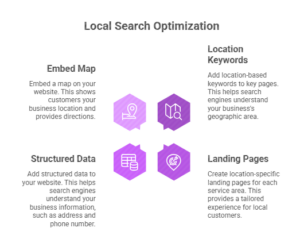
Your website reinforces your location relevance and showcases your offerings in detail.
While your GBP gets you into the map pack, your website drives organic rankings below that.
Add Location-Based Keywords to Key Pages
Use your service + location keywords on your homepage and main service pages.
Include them in title tags, meta descriptions, URLs, headers, and naturally throughout your content.
For example, a dentist in Austin might use this title tag: “Family Dentist in Austin, TX | Comprehensive Dental Care”
The H1 might be: “Austin’s Trusted Family Dental Practice”
Use your location keyword early on the page, ideally in the main headline and visible above the fold.
But don’t overdo it. One or two natural mentions per page element is plenty. Clear, helpful content beats keyword-stuffed copy.
Create Location-Specific Landing Pages
If you serve multiple cities or regions, create dedicated pages for each.
Each page needs 100% unique content. Don’t just swap out city names in a template. That creates thin, duplicate content that doesn’t rank.
Instead, write from scratch for each location. Mention local landmarks, neighborhoods you serve, and area-specific details.
For example, a roofing company serving both Brookline and Newton shouldn’t use identical pages with just the city name changed.
The Brookline page might discuss common roofing challenges in that area, mention local building codes, and reference specific neighborhoods.
The Newton page would do the same, but with Newton-specific details.
Add Structured Data (Schema Markup)
Schema markup is code you add to your website that helps search engines understand your content.
For non-technical readers, there are simple ways to add schema without writing code. You can use tools like Google Structured Data Markup Helper or plugins like Yoast SEO (for WordPress) to easily create and implement schema. These tools streamline the process and make adding structured data much less intimidating.
For local businesses, the LocalBusiness schema is most important. It tells search engines your name, address, phone number, hours, services, and geographic coordinates.
At a minimum, include:
- Business name
- Phone number
- Street address
- City, state, ZIP code
- Website URL
- Business hours
- Logo and images
- Latitude and longitude coordinates
You can get more specific with subtypes like “Dentist,” “Restaurant,” “Electrician,” or “LegalService.”
Add schema to your homepage, contact page, and individual location pages.
Test your markup with Google’s Rich Results Test tool before publishing to ensure it’s valid.
Embed a Map
Add a Google Map embed to your Contact or About page.
This simple step reinforces your location and makes it easier for customers to find you.
Visit Google Maps, find your business, click “Share,” then “Embed a map.” Copy the HTML code and paste it into your website.
Step 6: Build Local Backlinks That Move the Needle
Local backlinks signal trust and authority to Google.
According to Whitespark’s research, link signals account for approximately 8% of local pack rankings and 24% of localized organic rankings.
For organic visibility, they’re critical.
The difference with local SEO is the type of links that matter most. National directories and industry blogs help. But local, geographically relevant links carry more weight.
The 6 Highest-Value Sources
Local news and media
Getting featured in your local newspaper, TV station website, or regional news blog provides a powerful backlink.
Pitch newsworthy stories: grand openings, milestone anniversaries, community involvement, unique services, or expert commentary on local issues.
Chamber of Commerce
Most Chambers have member directories with links to member websites.
Membership typically costs $200-$1,000 annually. Beyond the link, you get networking opportunities and increased local credibility.
Business associations
Industry-specific associations often maintain member directories.
Plumbers might join local contractor associations. Restaurants might be part of hospitality groups. These organizations link to members’ websites.
Local events and sponsorships
Sponsor a Little League team, charity 5K, or community festival.
Most events list sponsors on their websites with links. Even small sponsorships ($100- $500) can earn high-quality links.
Community partnerships
Partner with other local businesses that serve the same customers but aren’t direct competitors.
A wedding photographer might partner with local florists, venues, and caterers. Each can link to the others on resource pages or blog posts.
Supplier and vendor relationships
If you work with local suppliers or vendors, ask if they feature customers on their website.
Many manufacturers and distributors maintain case studies or customer spotlights that include links.
Quality Over Quantity
One link from a trusted local news site is worth more than 50 links from random directories.
Focus on relevance and authority. Ask yourself: would this link send qualified traffic even without the SEO benefit?
If yes, it’s probably worth pursuing.
Avoid link farms, paid link schemes, and irrelevant directories. These can trigger penalties and do more harm than good.
Step 7: Create Content That Attracts Local Customers
Content marketing supports your rankings and attracts traffic beyond your main service pages.
The right content answers questions your customers actually ask, establishes expertise, and provides value that earns links and shares.
Content Types That Work
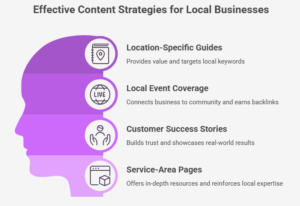
Location-specific guides provide value while targeting local keywords.
A landscaping company might create “The Complete Guide to Drought-Resistant Plants for Denver Gardens” or “Best Seasonal Flowers for Chicago Climate.”
These posts target local searchers and position you as a local expert.
Local event coverage connects your business to your community.
Write about local festivals, charity events, or seasonal activities – link to event organizers, community groups, and local venues.
This earns local backlinks and shows Google you’re part of the community.
Customer success stories build trust and provide real-world examples of your work.
Feature local customers (with permission). Mention specific neighborhoods or landmarks to reinforce geographic relevance.
Service-area pages aren’t just landing pages – they’re opportunities for in-depth local content.
Instead of thin pages with just your NAP and a generic description, create comprehensive resources. Explain what makes serving that area unique, what local regulations apply, and what customers in that area typically need.
Content Optimization Tactics
Integrate location keywords naturally. If you’re writing about plumbing issues common in older homes, mention the neighborhoods in your area with older housing stock.
Use entity-based SEO. Mention local landmarks, parks, shopping districts, and well-known locations. This builds geographic relevance signals.
Encourage user-generated content. Ask customers to share photos of completed projects, write guest posts, or participate in case studies.
This provides authentic content and deepens engagement.
Step 8: Optimize for “Near Me” & Voice Search
Mobile searches account for more than 60% of all Google searches. (Search Engine Statistics 2017 to 2026: Trends, Insights & Forecast, 2023)
Many of these include “near me” or are voice-activated.
Optimizing for these searches captures on-the-go customers ready to make immediate decisions.
Why “Near Me” Searches Matter
According to Google, “near me” searches have grown by more than 500% in recent years. (Gevelber, 2018)
These searches signal high intent. Someone searching “coffee shop near me” wants to go somewhere now, not research options for next week.
If you rank for these queries, you capture customers at the exact moment they’re ready to visit or call.
Voice Search Optimization
Voice searches use conversational language and question formats.
Instead of typing “pizza Chicago,” someone might ask their device, “Where’s the best pizza place near me?”
To optimize:
Target question-based keywords. Create content that answers “Who,” “What,” “Where,” “When,” “Why,” and “How” questions about your services.
Use conversational phrasing. Write in natural language that matches how people speak, not how they type.
Implement FAQ schema. This structured data helps Google pull your answers directly into voice results and featured snippets.
Focus on featured snippets. Voice assistants often read featured snippet content as answers – structure content with clear, concise answers to common questions.
Step 9: Scale Across Multiple Locations
Multi-location businesses face unique challenges. Each location needs its own presence while maintaining brand consistency.
Done right, you can dominate multiple markets. Done wrong, you create duplicate content issues and confuse search engines.
Common Multi-Location Challenges
Duplicate content occurs when you use the same template for every location page, with only the city name changed.
Google sees this as thin content and may not rank any of the pages well.
Thin location pages lack substance. A page with just NAP information and “We serve [City]” doesn’t provide enough value to rank.
GBP management at scale becomes difficult when you have 10, 50, or 100 locations. Maintaining accurate information and responding to reviews requires dedicated resources.
The Solution Framework:
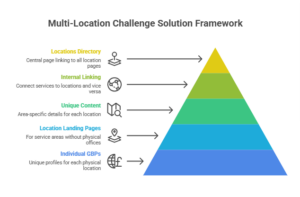
Create individual GBPs for each location. Every physical location needs its own profile with unique information.
If you operate from one office but serve multiple cities, you can’t create GBPs for service areas. You’ll need to rely on location landing pages for those markets.
Write unique content for each location page. Include area-specific details: local landmarks, neighborhoods served, unique challenges customers in that area face, and local team members.
Aim for at least 500 words of truly unique content per location.
Build location-specific internal linking. Link from your main services pages to each location. Link from each location page to relevant service pages.
This creates a clear site architecture that Google can understand.
Create a locations directory. Build a central “Locations” page that links to all individual location pages. This helps users find their nearest location and helps search engines discover all your location pages.
Step 10: Local SEO vs Google Ads – The ROI Comparison
You might wonder if you should skip SEO and run ads.
Let’s look at the numbers.
The Cost Breakdown
The average small business spends $1,000 to $10,000 per month on Google Ads. Over a year, that’s $12,000-$120,000. (Small Business Marketing Budget: ZipDo Education Reports 2026, 2026)
When you stop paying, traffic stops immediately.
Local SEO requires upfront investment: GBP setup and optimization, citation building, website optimization, content creation, and ongoing management.
Initial costs typically range from $2,000 to $10,000 for DIY efforts or $5,000 to $30,000 if you hire an agency. These upfront costs usually cover essentials such as setting up and optimizing a Google Business Profile, building citations across major directories, creating or improving core website content, and basic on-page SEO work.
If you work with an agency, the investment also often includes a detailed strategy, technical SEO fixes, and ongoing performance tracking. Knowing these components can help you budget and compare the value of different local SEO options.
When deciding between in-house management and hiring an agency, consider your team’s expertise, available time, and overall goals. In-house management is often cost-effective for businesses with a marketing team willing to learn and dedicate ongoing hours to local SEO. This approach offers greater control over strategy and allows you to build internal knowledge.
However, if your resources are limited or you need fast, expert results, partnering with an agency can save time and deliver professional outcomes.
Agencies bring specialized skills, proven processes, and efficiency, especially if you have multiple locations or face a highly competitive market. The right choice depends on your budget, timeline, and whether you want to develop talent internally or leverage outside expertise.
Ongoing maintenance costs $500-$2,000 per month.
But the traffic keeps coming even if you pause optimization work.
Performance Metrics Comparison
| Metric | Local SEO | Google Ads |
| Time to Results | 3-6 months | Immediate |
| Cost Structure | Upfront + maintenance | Pay-per-click ongoing |
| Sustainability | Compounds over time | Stops when the budget ends |
| Trust Factor | High (organic) | Lower (paid) |
| Click-Through Rate | 28.5% (position 1) | 3-5% average |
| Long-term ROI | Increases yearly | Stays flat |
When to Use Both
SEO and PPC work best together, not as competitors.
Use Google Ads to generate immediate leads while your SEO builds momentum. As organic rankings improve, you can reduce ad spend.
Use PPC data to inform SEO. The keywords that convert well in paid campaigns are often worth targeting organically.
Run ads for highly competitive keywords where ranking organically is difficult. Focus SEO on keywords where you have a realistic chance to rank.
For most local businesses, a hybrid approach delivers the best results: SEO for sustainable traffic and ads for immediate needs and highly competitive terms.
Step 11: Measure Local SEO Performance
You can’t improve what you don’t measure.
Track the right metrics to understand what’s working and where to focus your efforts.
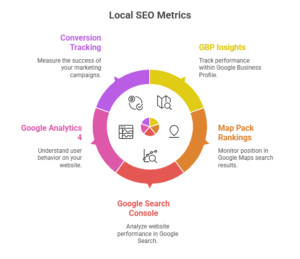
Key Metrics to Track
GBP Insights
It shows how customers find and interact with your profile.
Track views (how often your profile appears), searches (direct vs discovery), actions (website clicks, direction requests, phone calls), and photo views.
Rising metrics indicate improving visibility. Declining metrics signal problems to investigate.
Map pack rankings
It shows where you appear for target keywords.
Use tools like BrightLocal or Whitespark to track positions across multiple keywords and locations.
Focus on your top 10-20 most valuable keywords. Track weekly or monthly to spot trends.
Organic rankings track your website’s position in regular search results.
Google Search Console
It shows which queries drive traffic to your site and your average position for each.
Track your main service + location keywords and monitor movement over time.
Organic traffic measures actual search visitors.
Google Analytics 4
It shows total organic sessions, which pages get traffic, and how that traffic converts.
Filter by location to see traffic from your target geographic areas.
Conversion tracking
It measures business results, phone calls, form submissions, direction requests, and in-store visits.
Set up call tracking, form tracking in Google Analytics, and connect your CRM to see which leads convert to customers.
Calculate cost per lead and customer acquisition cost. Compare these to your ad campaigns to understand true ROI.
Tools You Need
Google Business Profile Insights are built into your GBP dashboard. Free and easy to access.
Google Search Console shows organic search performance. Also free.
Google Analytics 4 tracks website traffic and conversions. Free with advanced features.
Call tracking software like CallRail or CallTrackingMetrics shows which marketing channels drive phone calls.
Rank-tracking tools like Semrush, Ahrefs, and BrightLocal monitor keyword rankings across locations.
Your Complete Local SEO Audit Checklist
Use this checklist quarterly to ensure your SEO stays healthy:
Google Business Profile (15 checkpoints)
- Business name matches official name
- Correct primary category selected
- 3+ secondary categories added
- Complete business description (750 characters)
- Accurate NAP information
- Service areas defined
- Business hours updated (including holidays)
- 20+ high-quality photos
- All relevant attributes selected
- Responds to reviews within 3 days
- Posts published weekly
- Products/services sections completed
- Accepts online appointments/bookings (if applicable)
- Messaging enabled
- Q&A section monitored and answered
Citations (10 checkpoints)
- NAP matches across the website, GBP, and directories
- Listed on Data Axle/Localeze/Foursquare
- Active profiles on Yelp, Facebook, Apple Maps, Bing Places
- Listed in industry-specific directories
- Chamber of Commerce membership is active
- No duplicate listings exist
- Old business addresses removed or redirected
- Phone number is local (not toll-free)
- Website URL included in all citations
- Citations are reviewed quarterly for accuracy
On-Page SEO (12 checkpoints)
- Location keywords in homepage title tag
- Location keywords in the H1 tag
- NAP in website footer
- Google Maps embedded on the Contact page
- LocalBusiness schema implemented
- Mobile-friendly design
- Page speed score 80+ (Google PageSpeed Insights)
- Location-specific landing pages for each service area
- Unique content per location page (500+ words)
- Internal links from service pages to location pages
- Meta descriptions include location
- Image alt tags include relevant keywords
Reviews (8 checkpoints)
- Average rating 4.0+ stars
- 10+ new reviews in the past 90 days
- Response rate 90%+
- Average response time under 48 hours
- Review the request system in place
- Multiple review platforms monitored (Google, Yelp, Facebook)
- Negative reviews addressed professionally
- Review the schema implemented on the website
Backlinks (7 checkpoints)
- 10+ local backlinks acquired
- Chamber of Commerce link secured
- Local news or media mentions obtained
- Industry association memberships include website links
- Community partnerships or sponsorships are active
- Supplier/vendor relationships leveraged for links
- No spammy or low-quality links in profile
Technical SEO (10 checkpoints)
- SSL certificate active (HTTPS)
- Mobile responsiveness verified
- Core Web Vitals pass (LCP, FID, CLS)
- XML sitemap submitted to Google Search Console
- Robots.txt file configured correctly
- 404 errors fixed
- Duplicate content issues resolved
- Canonical tags implemented
- Site speed optimized (3 seconds or less)
- Structured data validated (no errors)
Run through this audit every quarter. Fix issues immediately to maintain and improve rankings.
Your 30-60-90 Day Action Plan
You now have the complete strategy. Here’s how to implement it:
Days 1-30: Foundation
- Create and verify your Google Business Profile
- Audit existing citations
- Complete all GBP fields (description, categories, hours, photos)
- Add the LocalBusiness schema to your website
- Claim profiles on top directories (Yelp, Facebook, Bing Places, Apple Maps)
- Conduct local keyword research
- Set up Google Analytics and Google Search Console
Days 31-60: Building
- Fix citation inconsistencies
- Build 20+ new citations (data aggregators, local directories)
- Create/optimize location-specific landing pages
- Implement a review request system
- Publish 2-4 pieces of location-focused content
- Reach out for local partnership/sponsorship opportunities
- Respond to all existing reviews
Days 61-90: Growth
- Secure 3-5 local backlinks
- Generate 10+ new customer reviews
- Create additional service-area pages if needed
- Publish regular content (2x per month minimum)
- Monitor rankings and adjust strategy
- Set up call tracking and conversion tracking
- Document processes for ongoing maintenance
Beyond 90 Days
- Maintain consistent review generation
- Publish helpful content monthly
- Earn 1-2 quality local backlinks per month
- Monitor and update citations quarterly
- Refresh GBP photos and posts weekly
- Track metrics and optimize based on data
Final Thoughts
Local SEO isn’t a one-time project. It’s an ongoing process that compounds over time. While you may not see instant results, sticking with the fundamentals and putting in steady effort will pay off. Every step you take builds momentum, and over time, your efforts create sustainable visibility and growth.
If you’re looking for early wins, focus on quick actions like claiming and optimizing your Google Business Profile, correcting any inconsistent business listings, and requesting reviews from recent customers. These steps can boost your visibility in local search and help you start seeing results sooner. Stay consistent and trust the process – local SEO rewards those who keep at it.
The businesses that dominate local search are the ones that commit to consistent effort: earning reviews, creating helpful content, building community connections, and maintaining accurate information.
You can’t rank overnight. But you can start today.
Follow this guide step by step. Focus on fundamentals first: a complete GBP, accurate citations, and customer reviews.
Then layer on website optimization, content, and link building.
In three to six months, you’ll see results. In a year, you’ll have built an asset that generates leads 24/7 without ongoing ad spend.
That’s the power of local SEO. Start building yours today.